title: "Looking for a CCleaner Alternative on Windows? Here's What to Compare" date: "2026-08-26" excerpt: "CCleaner has been the default Windows cleanup tool for twenty years, and plenty of people are looking for something else. Here is an honest comparison of what the alternatives actually do differently — and the questions worth asking before you install any of them." coverImage: "/images/blog/ccleaner-alternative-windows.png" categories: ["Comparison", "Windows", "Cleanup", "Storage"]
Looking for a CCleaner Alternative on Windows? Here's What to Compare
CCleaner has been the default answer to "my Windows PC is full" since 2004. It is genuinely good at what it was built for, and an enormous number of people have it installed.
It is also the most-searched-for-an-alternative utility on Windows, which is a slightly odd thing for a category leader. This post is about why people go looking, what the alternatives actually change, and — more usefully — what to compare, because most of these tools describe themselves in the same words.
Why People Start Looking
Worth being fair here: the reasons vary in seriousness.
Registry cleaning. CCleaner's most famous feature is also the one Microsoft has advised against for years. On Windows XP a bloated registry could measurably slow a machine. On Windows 10 and 11 it does not, and the risk of removing an entry something needed is not zero. Most modern alternatives have quietly dropped the feature; CCleaner keeps it because it is what people know it for.
Bundled offers and upsells. The free version has historically included additional software offers during installation and prompts to upgrade during use. This is a legitimate way to fund free software and also the single most common reason people say they switched.
The 2017 supply-chain incident. A compromised build of CCleaner was distributed through official channels for about a month, reaching roughly 2.3 million users. It was handled publicly, and Avast has since changed its build security. It is nine years ago now, but it permanently changed how some people feel about the product, and pretending otherwise would be dishonest.
Scope. CCleaner cleans. If you also want to organise files, find duplicates or securely erase things, you end up with three utilities.
None of that makes CCleaner a bad product. If it works for you, keeping it is a defensible choice.
What to Actually Compare
Most cleanup tools show you the same screenshot: a big scan button and a number of gigabytes. Here is what separates them once installed.
1. Does it tell you what it will delete, before it deletes it?
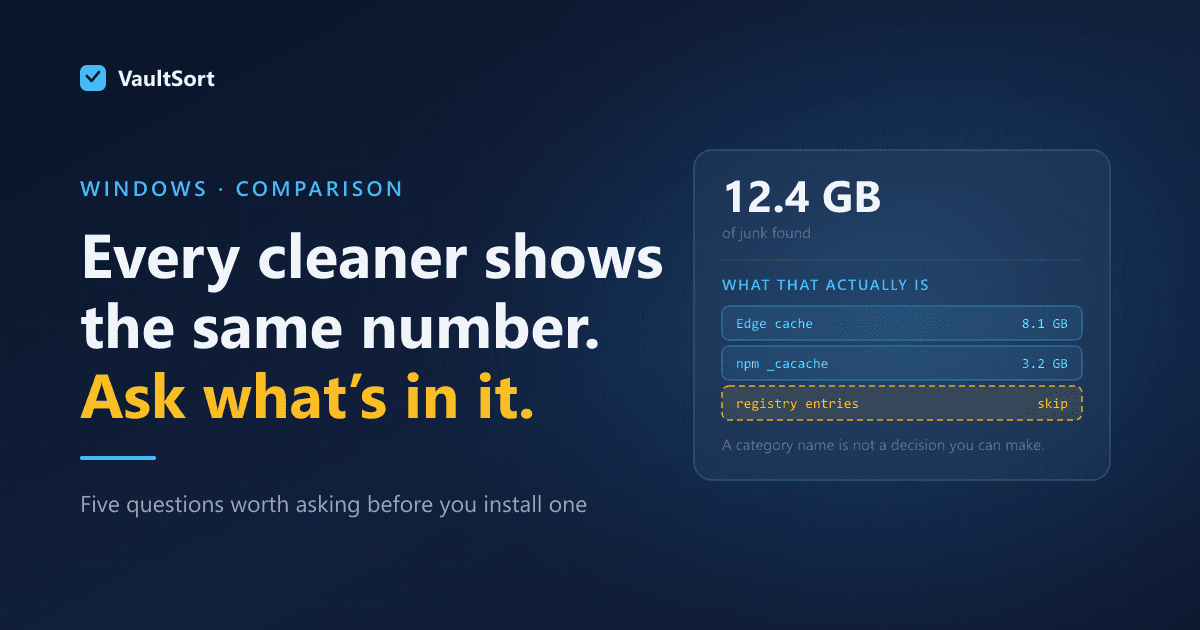
This is the single most important question and the one most tools answer worst. A tool that reports "12.4 GB of junk found" and offers a Clean button is asking you to trust a category name.
Look for a per-path breakdown. You want to see that 8 GB of that number is one browser's cache and 3 GB is a package manager's build directory, because those are decisions you can actually make.
2. Does it distinguish "cache" from "looks disposable"?
Caches are safe to delete by definition — expensive to rebuild, never authoritative. Plenty of things that look like caches are not: a .git directory, a partially downloaded file, an application's local database.
The safe design is an allowlist — only remove paths known to be cache locations — rather than a heuristic that guesses from folder names.
3. What does it do when it cannot delete something?
On Windows, locked files are routine rather than exceptional. A browser holding its own cache open will refuse a delete every time.
The honest behaviour is to report it. The unhelpful behaviour is either to report a failure that was actually a locked file being used normally, or to silently count it as cleaned. Both are common.
4. Does it touch the registry, and can you decline?
If a tool cleans the registry by default, that tells you something about how it thinks about risk.
5. What is the business model?
Free with bundled offers, free with upsells, one-off purchase, subscription. None of these is wrong, but they predict how the software will behave. A tool with nothing to upsell has no reason to inflate the number it shows you.
The Main Alternatives, Briefly
BleachBit — free, open source, no bundled anything. Cleans thoroughly and has a genuine secure-delete option. The interface is utilitarian and it will happily let you do something unwise, so it rewards knowing what you are doing.
Windows' own tools — Storage Sense and Disk Cleanup are built in, free, and safe. They will not find application caches outside the paths Microsoft knows about, which on a developer machine is most of the space.
Wise Disk Cleaner, Glary Utilities and similar — the same broad category as CCleaner with the same broad trade-offs, including registry cleaning and upsells.
VaultSort — different scope, covered below.
Where VaultSort Is Different
VaultSort for Windows is in beta, and it is not a like-for-like CCleaner replacement. The difference in scope is the point rather than a caveat.
It does not clean the registry. Deliberately. The evidence that registry cleaning helps a modern Windows install is not there, and the downside risk is real.
Cleaning is allowlist-driven. Space Saver removes paths that are known cache locations rather than anything that resembles one. That is a narrower net than some tools cast, and it is narrower on purpose.
Failures are reported as failures. When a run cannot delete something, it says so. An earlier version of this feature reported locked cache files identically to genuine errors, so a successful run that freed several gigabytes announced "52 files could not be deleted" — that was wrong in the other direction, and it got fixed. Both kinds of dishonesty matter.
It also organises, deduplicates and encrypts. Auto-organize with a full undo, content-based duplicate detection, AES-256 encryption backed by Windows Hello, and secure deletion including free-space shredding and TRIM. If all you want is a cleaner, that is more than you need.
One purchase, no upsell. There is nothing to sell you after the fact, which is also why there is no incentive to make the "space found" number look impressive.
Two honest limits. VaultSort for Windows is in beta — the macOS version has been shipping for years, the Windows build has not. And system-level cleanup is partial compared with the Mac version; the user-level cleaner is the part that has been exercised end to end.
The Short Version
If you want a straight cleaner and CCleaner works for you, keep it. If you left over the bundling or the registry cleaning, BleachBit is the closest free equivalent without either.
If the actual problem is that your files are a mess — and cleanup is only one part of that — then a tool that organises, deduplicates and cleans is a different proposition, and worth looking at on those terms rather than as a CCleaner substitute.
Whatever you choose, apply the five questions above. The tool that shows you a per-path breakdown and tells you honestly what it could not touch is the one worth trusting with your disk.
VaultSort for Windows is in beta and free to try. Download it here. Related: where your disk space actually goes on Windows.