title: "VaultSort Has a Vault" date: "2026-09-07" excerpt: "Two years of an app called VaultSort with no vault in it. Here is the one we built: an encrypted place on your own disk, opened with hardware you already carry, that survives a crash mid-import — and that will never hold your files hostage to a licence check." coverImage: "/images/blog/vaultsort-has-a-vault.png" categories: ["Announcement", "Security", "Encryption", "Privacy"]
VaultSort Has a Vault
For two years this app has been called VaultSort and has not had a vault in it. People noticed. The name came from what it did to files — sorting them, and locking the ones that mattered — but the second half was a verb, not a place. You could encrypt a file. You could not put it anywhere.
As of 5.3 you can. The Vault is an encrypted folder on your own disk that holds files, folders and notes together, opens with a security key or your fingerprint, and locks itself when you walk away.
This post is what it is, how it works, and the one design decision I would most like to be judged on.
A place, not an operation
Every feature VaultSort had before this was something you did. Organize these files. Erase that drive. Encrypt this document. Operations are easy to reason about and easy to build, and they have one persistent flaw: you have to remember to run them.
File-by-file encryption is the clearest case. It works exactly as advertised, and six months later you cannot remember which files you encrypted, where you left them, or whether the tax return you are looking at is the protected copy or the one you made to email your accountant. The protection is real and the filing system is you.
A vault moves the decision up a level. Things inside it are protected because of where they are. There is no moment where you meant to lock something and did not, because putting it in is locking it.
That is the whole idea. Everything below is in service of it.
How you open it
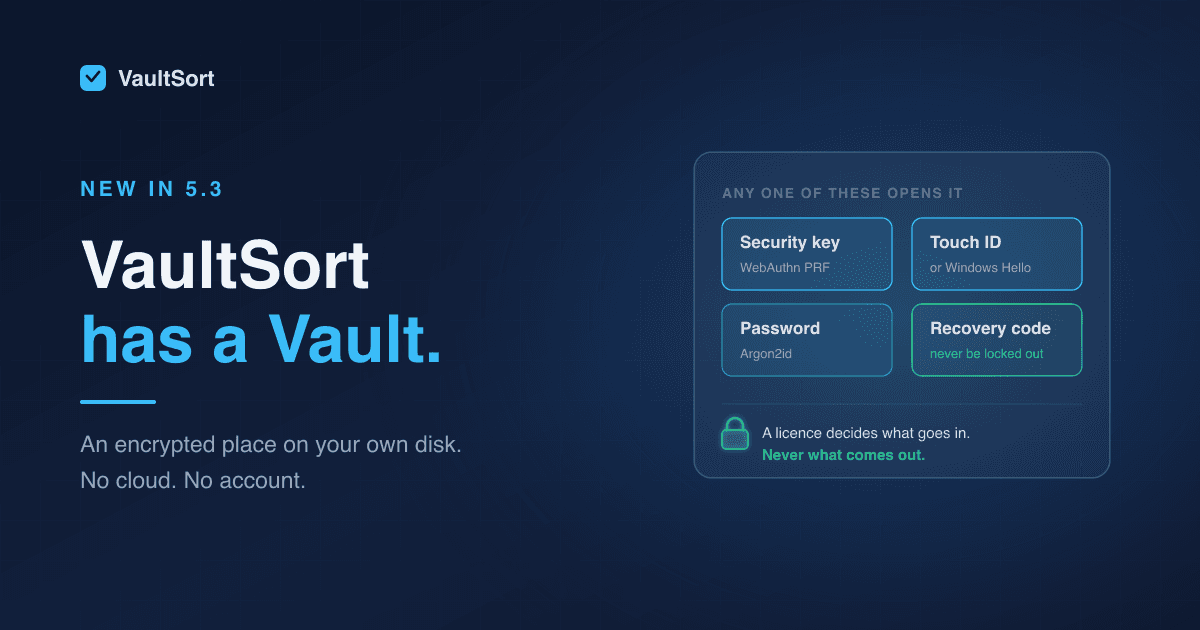
A Vault can hold several unlock methods at once, and any single one of them opens it.

- A security key. A YubiKey, or any FIDO2 key supporting the WebAuthn PRF extension. The key derives a secret that never leaves it.
- Touch ID, or Windows Hello. The authenticator already built into your machine, over the same WebAuthn path. Your fingerprint never reaches VaultSort; it reaches the operating system, which then vouches for you.
- A password. Stretched with Argon2id, calibrated to your machine at the moment you set it, for when you have no key on you.
- A recovery code. Generated once, displayed once, written down by you. Nothing stores it.
The four are peers, not a chain. That matters more than it sounds, and the next section explains why it is cheap to make them peers.
VaultSort asks you to add a second method when you create a Vault, and refuses to remove the last one. A vault with exactly one way in is a vault you can be locked out of by losing a single object, and that is a worse failure than most of the ones encryption is protecting you from.
What happens to a file on the way in
Three seals, applied in order.

- The file gets its own 256-bit key, used for it and nothing else, and its contents are encrypted with AES-256-GCM — so tampering is detected rather than quietly decrypted into something wrong.
- That per-file key is wrapped under the Vault's master key with AES-256-KWP. The master key exists in memory, and only while the Vault is open.
- The master key is sealed once per way in — separately for the security key, the fingerprint, the password and the recovery code.
The payoff of that third tier is the answer to the question everyone asks next: adding a password to a Vault you normally open with a YubiKey does not re-encrypt anything. It seals one small key one more time. A hundred gigabytes of files are not touched, because the files were never sealed to your YubiKey in the first place — the master key was.
It is also why losing a key costs you nothing. The other seals were never derived from it.
The part nobody puts in a demo
An encrypted store is only as good as its worst interruption.
Close the lid halfway through importing a folder. Lose power. Force-quit the app because something else has hung. If any of those can leave the Vault in a state it cannot read, then it is not somewhere you should keep anything, no matter how good the cryptography is.
So every multi-step change is written to a journal before it is made, and the next unlock replays that journal — completing what had committed, discarding what had not, and sweeping up anything abandoned in between. A crash costs you the import you were running. It does not cost you the Vault.
The same instinct runs through the rest of it. When the Vault locks, its keys are overwritten in memory rather than left for the garbage collector to get to eventually. Two VaultSort tasks cannot write to the same Vault, because the first one takes a lease on the folder. Nothing sensitive reaches the log — not a file name, not a note title, not a path — and there is a test that greps the log for exactly those things and fails if it finds them.
None of this is interesting to look at. It is most of the work.
Where the paywall stops
The Vault is a premium feature. Creating one requires a licence, and so does putting things into it.
Opening it does not. Neither does reading it, searching it, exporting from it, deleting from it, or adding a new recovery code. Those paths have no licence check on them at all, and they are built so that they cannot acquire one by accident: the channels that add data and the channels that retrieve it are listed separately in the source, every channel must appear in one list or the other, and leaving a new one out is a compile error rather than a quiet omission.
The reason is not generosity. A licence is a thing a program can be wrong about. Our licences are one-time purchases, so nobody's access ever legitimately lapses — but the app's belief about your licence can still read false. You could be offline when it tries to revalidate. You could be on a machine you have just reinstalled. You could have hit the activation limit moving to a new laptop.
If any of those could stand between you and your own files, then they were never really yours. So:
A paywall may block what goes in. It must never block what comes out.
If your licence ever fails to verify, your Vault degrades to read-only. It still opens. Everything in it still comes out. You lose the ability to add, and nothing else.
I would rather be held to that in public than explain it in a support ticket.
What it does not do yet
- It does not sync. A licence covers six devices; each keeps its own Vault. Encrypted off-device backup is on the roadmap as Cloud Vault, and it is a separate thing arriving later — optional when it does.
- There is no mobile app. Nothing to open a Vault with on a phone.
- It does not version files. Replacing a file in the Vault replaces it. The Vault is a safe, not a time machine.
- On Windows it is beta, like the rest of VaultSort on Windows. The format and the guarantees are the same; the platform is younger.
Getting started
Open VaultSort, go to Protect, and choose Vault. It will ask where to keep it — and tell you if the folder you picked is a poor idea, such as one that syncs to iCloud Drive or Dropbox, since a synced vault is a vault with copies you did not agree to.
Then pick how to open it, add a second method, write the recovery code down somewhere that is not the machine, and put something in it.
Start with the file you would least like to explain losing.