VaultSort 5.0 is here — and so is Windows
You may have noticed it's been quiet around here for almost a month or so. There's a reason, and it wasn't a lack of activity.
We've been building VaultSort for Windows — and finishing VaultSort 5.0.
Both are ready today. VaultSort 5.0 is out now for macOS, and VaultSort for Windows is open as a beta.
Your license now covers 6 devices, not 3
Let's start with the part that costs you nothing.
The activation limit on a VaultSort license has gone from 3 devices to 6 — and it's not per-platform. One purchase, six installs, across your Macs and your Windows machines.
If you bought VaultSort for your Mac and you also use a Windows PC, you don't need to buy anything else. It's the same license.
This applies to existing licenses too. You don't need to do anything.
VaultSort 5.0 for macOS — out now
If you're already running VaultSort, it will offer you 5.0 on your next update check.
Here is what's new:
- Choose Trash instead of secure delete when clearing duplicates. Clearing a large set of duplicates by overwriting every file could take hours, and on unencrypted flash storage that overwrite is best-effort anyway. There's now a Deletion Method toggle in the Duplicate Finder. Secure delete stays the default — we're not going to quietly make deletion less thorough on your behalf — but Trash is there when speed matters more, and every button and confirmation changes wording to match, so nothing promises an overwrite it isn't doing.
- Two ways a file could be lost during decryption, fixed. Choosing Decrypt on a file that only looked encrypted — a compressed disk image, say — could destroy the original. Separately, files protected with a hardware security key could be damaged if VaultSort tried a password on them. Both are fixed. If you use Decrypt or hardware security keys, this alone is worth updating for.
- Clearer answers about your drives. When VaultSort can't tell whether a drive is an SSD or a hard disk, it now says so and points you at the setting that lets you tell it — instead of guessing and offering you the wrong tool.
- Choose whether you get stable or beta updates, from Settings → Updates.
Plus a long list of smaller fixes — full details in the changelog.
VaultSort for Windows — now in beta
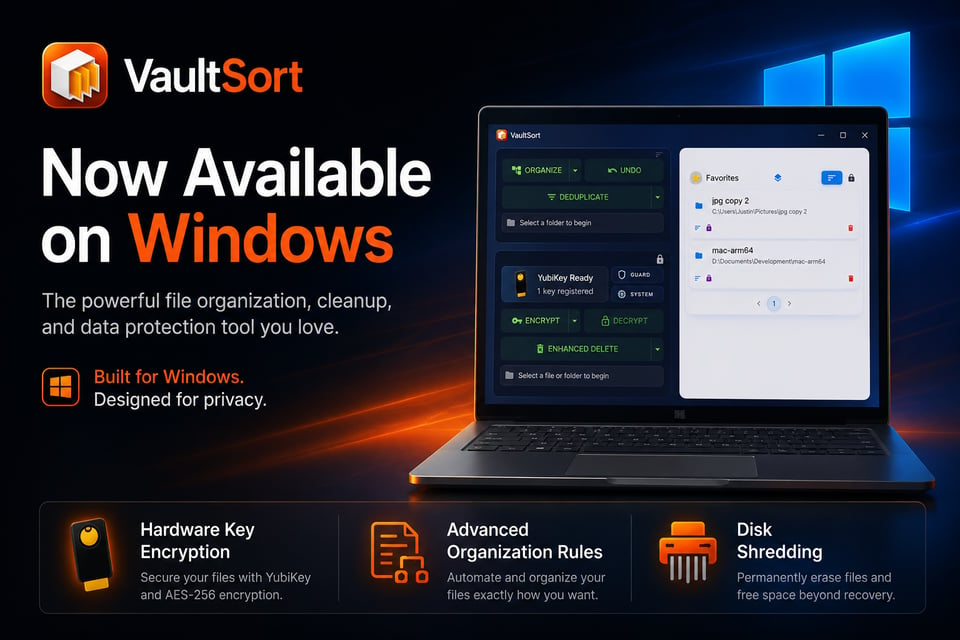
Not a port with half the features greyed out. The actual app.
Organizing, deduplication, encryption, Secure Delete, Guardian, scheduled jobs, and the on-device AI features all work on Windows 10 and 11, using Windows' own mechanisms where the underlying system differs. It even speaks the right language — you'll see "File Explorer" where a Mac says "Finder".
Requires Windows 10 or 11, 64-bit.
Windows-specific highlights:
- Disk Shred. Erase an entire drive or a single volume, with live progress instead of a spinner that tells you nothing.
- Free-space overwrite. Overwrite the unused space on a drive so files deleted long before you ever installed VaultSort can't be recovered from what's left behind.
- TRIM for flash drives. Where overwriting free space wouldn't actually help, VaultSort asks the drive itself whether it supports TRIM and offers that instead. If the drive says no, we tell you plainly rather than offering something that wouldn't work.
- File Explorer integration. Right-click to encrypt, decrypt, or securely delete, with a settings panel controlling which entries appear.
Two honest notes before you install
Windows will probably warn you. The installer is properly signed, but Microsoft's SmartScreen builds trust from download volume, and a brand-new Windows app has none yet. You may see "Windows protected your PC" — click More info, then Run anyway. The warning fades as more people install it.
It's a beta, and it's labelled one for a reason. It's had real testing, but not almost two years of it that the Mac version has. Keep backups of anything irreplaceable, as you would with any beta.
We'd genuinely like to hear from you
This is the part we actually need — especially from Windows users.
- Did anything fail, hang, or behave oddly?
- Did anything feel unclear — a button that didn't do what you expected, a message that didn't explain itself?
- What's missing that you'd want before you'd use it daily?
Reply directly to this email, or leave a comment. Every reply is read.
Thanks for sticking with us through the quiet month. It was worth it.
— Justin
{{ subscribe_form }}
Ready to Secure Your Mac?
Experience the latest features and security improvements mentioned in this update. Join thousands of Mac users who trust VaultSort to organize and protect their files.